Editing Rating Fields
 Clooz provides a rating control for displaying a rating or priority value in graphic form. Both positive and negative values are supported. Positive values are indicated by star images, and negative values as a red X.
The rating control is used in the following fields:
| Record Type | Field |
|---|---|
Information Record Information Records in Clooz hold the content information coming from a document or other source. These differ from a Source record that contains most of the citation information describing the docment, or the Repository record referring to the facility or online service where the document was found., Source A source record in Clooz should be viewed as the higher level components of a source citation. Citation details are pulled from the citing Information Record., Research Project A user-defined grouping of research objectives and tasks having something in common., Objective, Task Information Records in Clooz hold the content information coming from a document or other source. These differ from a Source record that contains most of the citation information describing the docment, or the Repository record referring to the facility or online service where the document was found., Source A source record in Clooz should be viewed as the higher level components of a source citation. Citation details are pulled from the citing Information Record., Research Project A user-defined grouping of research objectives and tasks having something in common., Objective, Task |
User Rating |
| Research Project, Objective, Task | Priority |
| Information Record Events and Families, Participants | Confidence Rating |
The maximum number of stars and X's Clooz will display is 4. The default starting value is none, displaying no stars or X's.
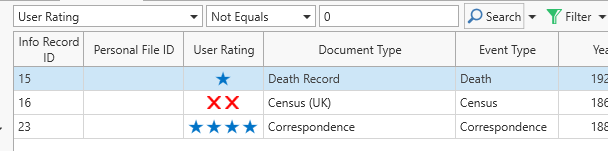 These rating fields can be sorted, searched, and filtered on the main screen data pages using a numerical value ranging from -4 to 4, where -4 is 4 X's, 0 is no stars or X's, and 4 is 4 stars.
In all cases, the definition of each rating level is left to the user since there are numerous ways users might want to use these fields.
Selecting Rating Values
To preview a new selection, hover the cursor over the stars or X's.
To designate a rating value using the rating control, do one of the following:
-
Click on the star or X representing the level you want to select. You can only directly select a rating value of 1-4 items (stars or X's), whichever is showing at the time. Otherwise edit using the increase and decrease buttons.
-
 Activate the edit mode of the rating control edit mode by pressing the tab (or Shift-tab) from an adjacent control. When activated by keyboard navigation, a focus box will appear around each star in sequence. When this box is visible, use the left and right arrow keys to change the rating level value.
 -
Click on the plus or minus button to increase or decrease the rating level.
Use the increase or decrease buttons to return the rating level to 0 (no stars or X's), or to transition to stars from X's or from X's back to stars. If one star is selected and you press the decrease button, the rating value returns to 0 (no stars or X's). Continuing to decrease will switch the display to X's. To return to star icon's, click the increase button until the desired value is obtained.